
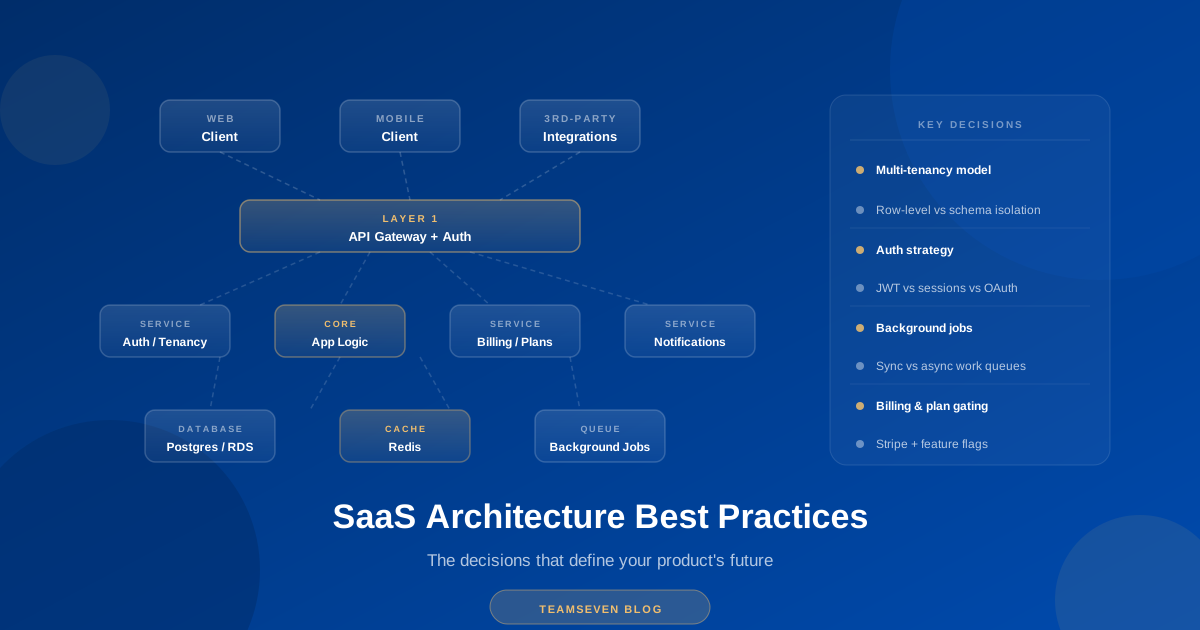
Most SaaS architecture articles give you a list of buzzwords: microservices, event-driven, serverless, CQRS. They describe architectures that work at Netflix scale and then imply you should build that way from day one.
You shouldn't. And the founders who try usually regret it.
This post is about the architecture decisions that actually matter at SaaS scale — the ones you make in months one through six that you'll either be grateful for or paying to fix two years later. I'm writing it from the perspective of someone who has built SaaS products, inherited SaaS codebases, and cleaned up the aftermath of both good and bad architecture decisions.
I'll cover what to get right early, what to get wrong deliberately (because some things don't matter until they matter), and the specific trade-offs that no one explains honestly.
The one principle that guides everything else
Before getting into specifics: the goal of SaaS architecture is not elegance. It's not technical purity. It's not impressing other developers.
The goal is to ship a product that works, that you can change quickly, and that doesn't collapse when it gets users.
Every architecture decision should be evaluated against those three criteria — in that order. An architecture that's technically beautiful but slow to change is worse than one that's messy but lets you iterate. An architecture that's fast to build but collapses at 1,000 users is worse than a slightly slower one that handles 100,000.
Keep this in mind when you read everything below.
Multi-tenancy: the most consequential early decision
Multi-tenancy is how your SaaS serves multiple customers from the same infrastructure. It's the defining characteristic of B2B SaaS, and the model you choose early is expensive to change later.
There are three main approaches:
Shared database, shared schema
Every customer's data lives in the same tables, distinguished by a tenant_id column.
-- Every table looks like this
CREATE TABLE projects (
  id UUID PRIMARY KEY,
  tenant_id UUID NOT NULL REFERENCES tenants(id),
  name VARCHAR(255) NOT NULL,
  created_at TIMESTAMP DEFAULT NOW()
);

-- Every query filters by tenant
SELECT * FROM projects WHERE tenant_id = $1;
Advantages: Simplest to build. Cheapest to operate. Adding a new tenant is one database row. Aggregate analytics across all tenants is straightforward.
Disadvantages: Tenant isolation is entirely in your application logic. If a bug removes the tenant_id filter from a query, customers can see each other's data. This has happened to real products. It's catastrophic. You also can't easily give tenants database-level isolation or their own backup/restore cycles.
When to use it: Early-stage SaaS where developer time is the scarce resource. Works well until you have customers with data isolation requirements (enterprise clients, regulated industries, clients with strict security requirements).
Shared database, separate schemas
Each tenant gets their own database schema (namespace), but all schemas live in the same database instance.
-- Tenant A
CREATE SCHEMA tenant_a;
CREATE TABLE tenant_a.projects (id UUID, name VARCHAR(255));

-- Tenant B
CREATE SCHEMA tenant_b;
CREATE TABLE tenant_b.projects (id UUID, name VARCHAR(255));

-- Queries are schema-specific
SET search_path TO tenant_a;
SELECT * FROM projects;
Advantages: Stronger isolation than shared schema. Migrations can target individual tenants. Easier to backup and restore individual tenant data. No risk of accidental cross-tenant data exposure from missing tenant_id filters.
Disadvantages: Schema-per-tenant migrations are complex at scale — running a migration across 500 tenant schemas takes careful tooling and time. Database connection pooling becomes more complex. Running analytics across all tenants requires cross-schema queries.
When to use it: Mid-market SaaS where some customers are starting to ask about data isolation. Good middle ground between operational simplicity and isolation.
Separate databases per tenant
Each tenant gets their own database instance.
Advantages: Complete isolation. Individual tenant databases can be sized, backed up, and restored independently. Enterprise clients can be given their own database credentials. Compliance requirements (GDPR right to erasure, for example) are cleanly handled by deleting the tenant's database.
Disadvantages: Operationally expensive. 500 tenants means 500 databases to maintain, monitor, and back up. Cross-tenant analytics requires data warehouse or ETL pipeline. New tenant provisioning is slower.
When to use it: Enterprise-focused SaaS where large clients have data sovereignty requirements, regulated industries where data isolation isn't optional, or products where tenant databases are genuinely different sizes (one tenant has 100GB of data, another has 1MB).
What to actually do
For most SaaS products: start with shared database, shared schema. Add a RLS (Row Level Security) policy at the database level as a safety net against application-layer mistakes.
-- PostgreSQL Row Level Security
ALTER TABLE projects ENABLE ROW LEVEL SECURITY;

CREATE POLICY tenant_isolation ON projects
  USING (tenant_id = current_setting('app.current_tenant_id')::UUID);
RLS means even if your application forgets the tenant_id filter, the database enforces it. This catches the entire category of cross-tenant data leakage bugs before they reach production.
Plan the migration path to schema-per-tenant when you start winning enterprise clients. Don't build it before you need it.
Authentication and authorization
Authentication (who are you?) and authorization (what can you do?) are the two security layers every SaaS needs. They're also the two things developers most often underdesign early and pay to rebuild later.
Authentication: don't build it yourself
JWT-based authentication is not hard to implement. But maintaining it — token rotation, refresh token handling, session invalidation, MFA, SSO integration, password policies, breach detection — adds up to a significant ongoing engineering investment.
Use an authentication service. Auth0, Clerk, Supabase Auth, and AWS Cognito all handle this. The cost is real but almost always less than the engineering time to build and maintain equivalent functionality.
The one exception: if your SaaS has unusual authentication requirements that these services can't handle, or if you're in a regulated industry where third-party authentication services create compliance problems.
Authorization: plan for complexity
Most SaaS products start with simple roles: admin and user. Most SaaS products end up with complex permission requirements: role-based access control with custom roles, resource-level permissions, team-level permissions, feature flags per plan tier.
Design your authorization layer to handle this complexity before you need it. The two common approaches:
RBAC (Role-Based Access Control): Users are assigned roles. Roles have permissions. Permissions gate actions. Standard and well-understood. Works for most SaaS products.
Attribute-Based Access Control (ABAC): Permissions are determined by evaluating policies against attributes of the user, the resource, and the context. More flexible than RBAC but significantly more complex to implement and reason about.
For most SaaS products, RBAC is sufficient. The important thing is designing it with extensibility in mind — it's much easier to add roles and permissions to a well-designed RBAC system than to retrofit RBAC onto a codebase that hardcoded three user types.
A minimal but extensible RBAC schema:
CREATE TABLE roles (
  id UUID PRIMARY KEY,
  tenant_id UUID REFERENCES tenants(id),
  name VARCHAR(100) NOT NULL,
  is_system_role BOOLEAN DEFAULT FALSE
);

CREATE TABLE permissions (
  id UUID PRIMARY KEY,
  resource VARCHAR(100) NOT NULL,  -- 'project', 'invoice', 'user'
  action VARCHAR(50) NOT NULL,      -- 'create', 'read', 'update', 'delete'
  UNIQUE(resource, action)
);

CREATE TABLE role_permissions (
  role_id UUID REFERENCES roles(id),
  permission_id UUID REFERENCES permissions(id),
  PRIMARY KEY (role_id, permission_id)
);

CREATE TABLE user_roles (
  user_id UUID REFERENCES users(id),
  role_id UUID REFERENCES roles(id),
  PRIMARY KEY (user_id, role_id)
);
This lets you add roles and permissions without schema changes, and lets enterprise tenants create custom roles.
Database design decisions that compound over time
Use UUIDs, not auto-incrementing integers
Auto-incrementing IDs expose your data volume to anyone who can observe two consecutive records. They also create merge conflicts if you ever need to combine databases. UUIDs are slightly larger and slightly slower to index, but neither matters at SaaS scale, and the operational benefits are real.
-- This
id UUID PRIMARY KEY DEFAULT gen_random_uuid()

-- Not this
id SERIAL PRIMARY KEY
Soft deletes from day one
Hard deletes — DELETE FROM table WHERE id = $1 — are irreversible and lose data that's often useful later. Soft deletes mark records as deleted without removing them.
ALTER TABLE projects ADD COLUMN deleted_at TIMESTAMP;

-- "Delete"
UPDATE projects SET deleted_at = NOW() WHERE id = $1;

-- All queries filter by default
SELECT * FROM projects WHERE deleted_at IS NULL;
Soft deletes enable:
- Undo functionality (easy to implement, users love it)
- Audit trails (when was this deleted and by whom?)
- Data recovery when customers accidentally delete things
- Analytics on historical data
The cost is slightly more complex queries and a larger database. Worth it for virtually every SaaS product.
Audit logging is not optional for B2B SaaS
Enterprise clients will ask for audit logs. They want to know who did what and when. If you don't have audit logging when they ask, building it retroactively is painful.
A minimal audit log table:
CREATE TABLE audit_logs (
  id UUID PRIMARY KEY DEFAULT gen_random_uuid(),
  tenant_id UUID NOT NULL,
  user_id UUID,
  action VARCHAR(100) NOT NULL,
  resource_type VARCHAR(100) NOT NULL,
  resource_id UUID,
  changes JSONB,
  ip_address INET,
  created_at TIMESTAMP DEFAULT NOW()
);
Log every write operation. Store the before and after state in changes. Index on tenant_id and created_at. You don't need to query audit logs often, but when you do, you need them.
Database migrations: use them properly
Every schema change should go through a migration file, committed to version control, that can be run forward and (where possible) rolled back.
# This is what a migrations directory should look like
migrations/
  001_create_tenants.sql
  002_create_users.sql
  003_create_projects.sql
  004_add_deleted_at_to_projects.sql
  005_add_audit_logs.sql
Never make schema changes directly in production. Never. The discipline of migrations means your development, staging, and production databases can always be synchronized, and every developer knows exactly what schema they're working with.
API design for SaaS
REST vs GraphQL
REST is the right default for most SaaS APIs. It's well-understood, well-tooled, easy to document, and easy to secure. GraphQL has genuine advantages for complex, nested data requirements — but it also adds complexity in schema management, authorization (field-level permissions are harder in GraphQL), and caching.
Use REST unless you have a specific reason not to.
Version your API from day one
/api/v1/projects
/api/v1/users
When you inevitably need to make breaking changes, /api/v2/ exists and your existing integrations continue to work. API versioning is trivial to add at the start and expensive to add retroactively.
Rate limiting is not optional
Without rate limiting, a single misbehaving client — or a malicious one — can degrade your service for everyone. Implement rate limiting at the API gateway or middleware layer, not in your application code.
Common approach for SaaS: rate limit by tenant and by user. Tenants on higher plans get higher limits. Tenants approaching their limit receive Retry-After headers before hitting 429 errors.
Idempotency for write operations
For operations where duplicate requests would cause problems — creating a payment, sending an email, processing an order — design for idempotency using client-provided idempotency keys.
POST /api/v1/invoices
Idempotency-Key: client-generated-unique-key-here
If the same request is received twice with the same idempotency key, return the result of the first request rather than processing it twice. This makes your API safe to retry on network failures without double-processing.
Background jobs and asynchronous processing
Anything that takes more than a few hundred milliseconds shouldn't happen in the HTTP request cycle. This includes sending emails, generating PDFs, processing webhooks, syncing with third-party services, running reports, and resizing images.
Move these to a job queue. The basic architecture:
HTTP Request → API → Queue job → Return 202 Accepted
                         ↓
               Worker → Process job → Update database
                         ↓
               Client → Poll for result or receive webhook
Common job queue implementations:
- BullMQ (Node.js + Redis) — excellent for Node.js SaaS, good monitoring tooling
- Sidekiq (Ruby) — if you're on Ruby
- Celery (Python) — if you're on Python
- Hangfire (.NET) — if you're on .NET
Whatever you choose, ensure:
- Jobs are retried on failure (with exponential backoff)
- Failed jobs are captured for inspection (dead letter queue)
- Job processing is monitored and alerted on queue depth
- Jobs are idempotent where possible (so retries don't cause problems)
Billing integration: less simple than it looks
Stripe is the right choice for most SaaS billing. Their documentation is excellent, their APIs are well-designed, and their webhook system is reliable.
But billing is genuinely complex. Things that seem simple:
Subscription upgrades mid-cycle. If a customer upgrades from Plan A ($50/month) to Plan B ($100/month) on day 15 of a 30-day cycle, what do they owe? Stripe handles proration, but your application needs to understand what that means for feature access.
Failed payments. Cards expire. Charges fail. You need a dunning process: retry the charge, notify the customer, downgrade access after N days, allow reactivation. Each step has states your application needs to track.
Usage-based billing. If your plan includes pricing based on API calls, active users, or storage, you need to meter usage and report it to Stripe accurately. Metering at scale is its own engineering problem.
Invoice customisation. Enterprise customers frequently need custom invoice fields — purchase order numbers, billing addresses for specific entities, tax identification numbers. Stripe supports these but your application needs to collect and pass them correctly.
My recommendation: use Stripe's billing APIs rather than building your own billing layer, implement a billing state machine in your application (trial → active → past_due → cancelled), and test the failure paths as thoroughly as the happy path.
Observability: you can't fix what you can't see
Observability is the combination of logging, metrics, and tracing that tells you what your system is doing in production.
The minimum viable observability stack for a SaaS product:
Structured logging. Every log line should be JSON with consistent fields: timestamp, level, request_id, tenant_id, user_id, duration, and any relevant context. Don't log unstructured strings that require regex to parse.
Error tracking. Sentry, Rollbar, or Bugsnag. Every unhandled exception should be captured, grouped by type, and alerted on. You should know about application errors before your customers do.
Performance monitoring. Track response times for every API endpoint. Set alerts for p95 and p99 latency, not just averages. Averages hide the outliers that your slowest customers experience.
Uptime monitoring. External monitoring that checks your application from outside your infrastructure. When your application is down, your internal monitoring is often also down.
Database query monitoring. Identify slow queries before they become incidents. PostgreSQL's pg_stat_statements extension, combined with a monitoring tool, gives you a ranked list of the most time-consuming queries in your system.
What to get deliberately wrong
Some things don't matter until they matter. Getting them wrong deliberately — choosing the simpler approach with the knowledge that you'll upgrade it later — is a valid engineering strategy.
Start with a monolith. Microservices add operational complexity that's only justified when different parts of your system need to scale independently, be deployed independently, or be worked on by separate teams. A monolith that's well-organized internally is easier to extract into services later than a premature microservice architecture.
Start with a single database. You don't need Redis, Elasticsearch, a data warehouse, and a message broker from day one. Add each one when you have a specific problem it solves, not because the architecture looks impressive.
Start with simple deployment. A single server or a minimal cloud deployment is fine for a new SaaS product. Add Kubernetes, container orchestration, and auto-scaling when your traffic patterns justify it.
Don't optimise queries you haven't written yet. Add indexes when you can identify slow queries with real data. Premature indexing adds write overhead and storage cost.
The architecture review question
Before any significant architecture decision, ask: "If this decision is wrong, how hard is it to fix?"
Some decisions are hard to fix:
- Multi-tenancy model (data migration is painful)
- Primary database choice (migration is very painful)
- API versioning (retrofitting breaks existing clients)
- Authentication approach (migrating user credentials is complex)
Get these right early.
Some decisions are easy to fix:
- Framework version (upgrade path exists)
- Specific third-party service (swap it out)
- Deployment approach (re-deploy to new infrastructure)
- Caching strategy (add or remove layers)
It's fine to get these wrong first.
A note on technical debt
Every SaaS product accumulates technical debt. The founders who manage it well distinguish between deliberate debt (shortcuts taken consciously with a plan to repay) and accidental debt (problems that accrued without awareness).
Deliberate debt is fine. "We'll use a simple polling approach now and move to WebSockets when we have specific performance requirements" is deliberate debt. "We'll clean up this authentication code in Q3" is deliberate debt with a repayment date.
Accidental debt compounds silently and surfaces at the worst time. The solution is code reviews, periodic refactoring sprints, and a team culture where technical concerns are raised early rather than suppressed.
The best SaaS architectures I've seen aren't the most technically sophisticated. They're the ones where deliberate decisions were made, documented, and revisited as the product grew.
Muhammad Nabeel is the co-founder of Teamseven, a software development agency in Lahore, Pakistan. We've been building SaaS products for startups and enterprises since 2017. If you're making architecture decisions for a new SaaS product and want a second opinion, get in touch.
Building a SaaS product?
We've built multi-tenant SaaS platforms across the US, UK, and Australia. From architecture decisions on day one to scaling existing products past their initial design limits: