What Is AI Automation? A Practical Guide for Businesses (From Someone Who Builds It)
AI automation in plain English: what it is, how it differs from traditional automation and agentic AI, where it earns its keep and where it doesn't.

"AI automation" gets used to describe everything from a Zapier rule with an OpenAI step bolted on, to a fully autonomous system making judgment calls across a business. That range is doing a lot of quiet damage. It's why one founder's "we automated it with AI" is a script that runs twice a day, and another's is a system making decisions on messy, unstructured input in real time. This is the plain explanation: what AI automation is, how it's different from the automation you already have and from agentic AI, where it earns its keep, and where it burns money.
We build automation into the products we ship, including i-mve, which automates quoting and lead intake across 523 UK removals companies. So this is written from wiring the stuff into systems people run their businesses on, not from a slide deck.
The one-sentence version
AI automation is automation that uses AI to handle the steps a fixed rule can't (reading, judging, or deciding on messy input) instead of only executing steps you specified in advance.
That's the core distinction. Traditional automation runs steps you defined. AI automation runs steps where at least one of them requires interpretation, not just execution. Everything else in this guide is detail on where that difference matters.
How it's different from the automation you already have
Most businesses already run automation: a workflow tool, a Zapier or Make chain, a scheduled script, rules in a CRM. That's real, useful automation, and none of it involves AI.
Traditional automation runs on explicit rules. If this field equals that value, do this action. It executes exactly what you specified, every time, with zero interpretation. That's its strength. It's fast, cheap, and completely predictable. It's also its limit: the moment an input doesn't match the rule you wrote, it breaks or does nothing.
AI automation adds interpretation to the chain. Instead of "if status = new, assign to Bob," it's "read this incoming email, work out what it's asking for, and route it to whoever should handle that." The step that used to require a human, reading something messy and deciding what it means, is now a step the system can do itself.
So: traditional automation moves data along a path you defined. AI automation can look at unstructured input, work out what's going on, and decide the next step from that. That's the shift, from rules that only fire on exact matches, to a system that can handle the input that doesn't fit a rule.
AI automation vs agentic AI: they're not the same thing
These two get used interchangeably, and they shouldn't be. The difference matters for what you build.
AI automation is typically a defined workflow with one or more AI-powered steps inside it. The path is still yours (step 1, step 2, step 3) but one or two of those steps use AI to read, classify, extract, or draft, where a fixed rule couldn't. You're in control of the sequence; the AI handles the interpretation inside it.
Agentic AI is a step further: the system decides the sequence itself. You give it a goal, not a path, and it works out what steps to take, in what order, adjusting as it goes. (We've written a full breakdown of agentic AI if you want the deeper version.)
In practice, most businesses should start with AI automation, not agentic AI. A defined workflow with one smart step is easier to build, easier to test, easier to trust, and easier to fix when something goes wrong, because you already know eight of the nine steps are deterministic. Agentic systems are more powerful and more capable of handling unpredictable situations, but they're also harder to constrain, harder to debug, and easier to get expensively wrong. Most of the value businesses are chasing under the "AI automation" banner right now is sitting in the simpler category.
A concrete example
Say you want to handle an inbound lead from your website contact form.
Traditional automation: A rule routes every submission to the same shared inbox, or maybe splits by which form was filled out. Someone still reads each one, works out what the person wants, and decides who should follow up.
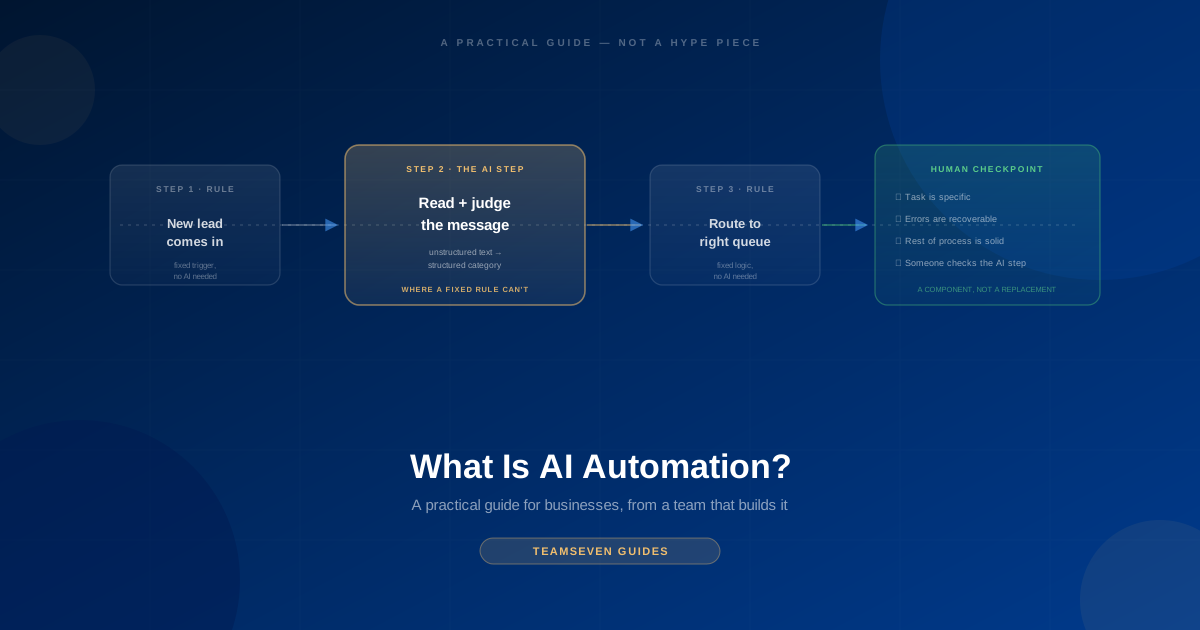
AI automation: The system reads the free-text message, extracts what they're asking for and how urgent it sounds, checks it against your CRM for whether they're an existing customer, tags the record with the right category, and routes it to the correct person or queue: all without a human reading it first. The path is fixed (read → extract → check → route); the AI does the reading and judging inside that path.
Agentic AI: You give it the goal: "handle new leads." It decides for itself whether to check the CRM first or read the message first, whether this one needs a follow-up question before it can be routed, whether to draft a reply now or wait for a human. The sequence isn't fixed; it's deciding step by step.
Most businesses asking "should we add AI automation" want the middle one. It's a smaller, more contained problem, and it's usually where the real ROI is.
Where AI automation helps a business
The pattern that shows up across the systems we've built: a workflow you already run, that breaks down at one specific step because the input is messy, unstructured, or requires reading rather than matching.
Good candidates:
- Classifying and routing unstructured input: emails, form submissions, support tickets, leads: where the category isn't in a dropdown, it's buried in free text
- Extracting structured data from documents: pulling line items off an invoice, terms out of a contract, fields out of a scanned form
- Drafting first-pass content inside a fixed workflow: a reply, a summary, a report section: that a human reviews before it goes out
- Matching and deduplication on fuzzy data: is this the same customer under a slightly different name, is this lead a duplicate of one already in the system
- Summarizing volume: turning a long thread, a stack of reviews, or a pile of notes into something a person can use in ten seconds
The common thread: a real workflow that already exists, with one step that currently needs a human to read and judge something, done often enough that automating just that step pays for itself.
Where it falls over
It's built on top of your existing process: a broken process stays broken, just faster. If the underlying workflow is unclear or inconsistent, adding an AI step doesn't fix that; it automates the inconsistency at higher speed. Fix the process first, then automate it.
It's probabilistic on the AI step, even inside a deterministic workflow. The rule-based steps around it are exact. The AI step (the classification, the extraction, the judgment call) is usually right and occasionally confidently wrong. For anything downstream where that one wrong classification is expensive (routing a legal complaint to the wrong queue, misreading an amount on an invoice), you need a human checkpoint at that step, not full trust in it from day one.
Garbage in still means garbage out, just with more confidence. AI automation is good at handling messy input, which makes it tempting to skip cleaning up your data sources entirely. That works until the mess is bad enough to fool the model too, and unlike a broken rule, a bad AI judgment doesn't announce itself as an error. It just looks like an answer.
It doesn't remove the need to define what "correct" looks like. You still need to know what a right outcome is, so you can check whether the system is producing it. "Automate the triage" isn't specific enough to build or measure. "Read the inbound message, extract the issue type and urgency, route to the matching queue, flag anything mentioning a refund for human review" is.
The thing I most want a business owner to understand
AI automation is not "add AI and the workflow runs itself." It's "identify the one or two steps in a workflow that currently require a human to read and judge, and let AI do that specific step, inside a process you still control."
That's a smaller, more honest claim than most of what gets pitched under this label, and it's also the version that ships and works. In i-mve, the automation around quoting is mostly conventional logic (rate cards, service areas, business rules) with AI handling the narrower job of reading messy lead data and getting it into a structured form the rules can act on. The AI isn't running the business logic. It's doing the one thing rules can't: making sense of input that doesn't arrive in a clean shape.
The businesses that get real value out of AI automation are specific about which step needs it. The ones that get an expensive, unreliable mess are the ones that tried to hand the whole workflow to the AI at once, on the theory that more AI is automatically better automation.
How to think about using it (a simple framework)
Before you invest in AI automation, ask four questions:
- What workflow, and which step? Not "automate customer service", which specific workflow, and which single step inside it currently needs a person to read and judge something?
- Is that step a good fit? Does it involve unstructured input, judgment, or classification that a fixed rule can't handle? If a simple if/then rule would already solve it, you don't need AI. You need automation.
- What happens when the AI step is wrong? Is there a human checkpoint before anything consequential happens, at least initially? Start there, and only remove the checkpoint once you've measured that the step is reliable enough to trust.
- Is the rest of the workflow solid? Is the process around this step already clear and consistent? If the workflow itself is a mess, that's the thing to fix first: AI automation makes a good process faster, not a bad one good.
If you can answer those four crisply, you have a real AI automation project. If you can't, you're buying a trend, not a solution.
The bottom line
AI automation is real, and it's useful. It's what lets a workflow handle the messy, unstructured input that used to force a human into the loop. But it's not a replacement for having a clear process, and it's not the same thing as agentic AI, which hands over the sequencing too, not just the judgment.
Start with one workflow. Find the one step that needs a human to read and decide something. Automate that step, with a human checkpoint until you trust it. That's a smaller pitch than "we automated the whole department with AI", and it's the version that works.
FAQ
What is AI automation in simple terms? Automation that uses AI to handle the steps a fixed rule can't (reading, classifying, or judging messy or unstructured input) inside a workflow you still define and control. The path is fixed; the AI handles the interpretation inside it.
Is AI automation the same as agentic AI? No. AI automation runs a workflow you defined, with AI doing one or more steps inside it. Agentic AI decides the sequence of steps itself, working toward a goal rather than following a fixed path. Most businesses should start with AI automation (it's easier to build, test, and trust) before moving to agentic systems.
How is AI automation different from the automation I already have? Traditional automation (Zapier rules, scheduled scripts, CRM workflows) executes exact rules on exact matches. If this, then that. AI automation adds a step that can interpret messy or unstructured input, so it keeps working on cases a fixed rule would break on or skip entirely.
Where does AI automation help a business? Classifying and routing unstructured input like emails or leads, extracting structured data from documents, drafting content inside a fixed review workflow, matching fuzzy or duplicate records, and summarizing high volumes of text. The common thread is a real workflow with one step that currently needs a human to read and judge something.
What should a business automate first with AI? Pick one existing workflow, find the single step where a person currently reads something messy and makes a judgment call, and automate just that step with a human checkpoint before anything consequential happens. Trying to hand over an entire workflow at once, instead of one well-defined step, is the most common way this gets expensive and unreliable.
Stay connected
Build notes, launches, and new articles from the Teamseven team.