

Walk into almost any modern café and you'll see it: a little QR code on the table. Scan it, the menu opens on your phone, maybe you order right there. It looks simple — and that simplicity is exactly the point, and exactly what makes it harder to build well than people expect.
We built TableTap — a live restaurant platform with digital QR menus, contactless ordering, and restaurant management, now used by cafés and restaurants. So this is a practical guide to building restaurant and hospitality software, from having shipped it rather than theorized about it.
What restaurant software actually has to do
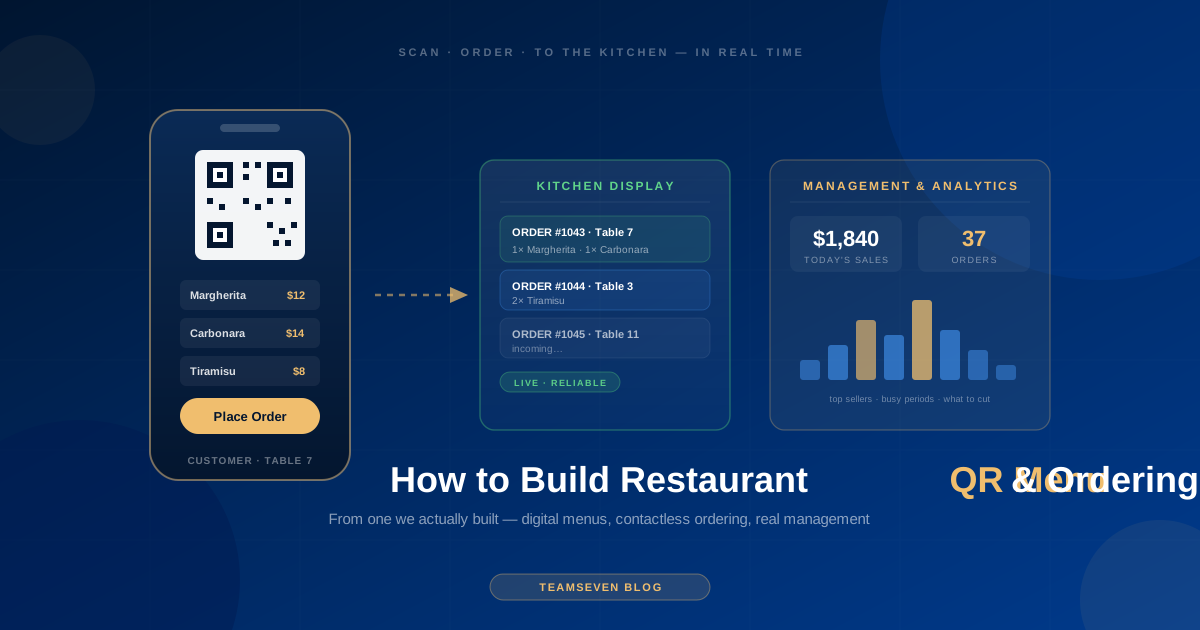
"Restaurant QR menu" sounds like one feature. A real restaurant platform is several systems working together:
The customer-facing menu — what the diner sees when they scan. Fast, clean, works on every phone, loads instantly, and reflects the current menu (not last month's prices).
The ordering system — if customers order through it, that order has to reach the kitchen or staff reliably, in real time, correctly. This is where it stops being a digital brochure and becomes operational software.
The restaurant management back end — where the owner or manager updates the menu, changes prices, marks items unavailable, manages orders, tracks tables and occupancy, and sees what's happening. This is the part diners never see and the part that makes the whole thing actually useful to the business.
The analytics — what's selling, what's not, when, busy periods, top products. Insights the owner can act on without needing to be a data analyst.
The QR code is just the doorway. The product is everything behind it.
Why restaurant software is harder than it looks
The users are busy and non-technical
A restaurant owner or manager is one of the busiest, least-technical software users you'll ever design for. They're running a kitchen, managing staff, serving customers. They do not have time to learn complicated software, and they will abandon anything that's harder than it needs to be.
This is the central design constraint of restaurant software: it has to be genuinely, almost aggressively simple. Updating a price has to take seconds. Marking an item sold-out has to be one tap. The management interface has to be usable by someone who's never going to read a manual and is checking it between serving tables. We designed for this constantly — every extra step in the management flow is a step a stressed owner won't take.
It has to work during service, reliably
Here's what separates restaurant software from a normal web app: it's used live, during service, when it's busy, and failure has immediate consequences. If the menu won't load while a table is waiting, that's a real diner having a bad experience right now. If an order doesn't reach the kitchen, that's a problem in the physical world, immediately.
The reliability bar is high because the failure mode is a real customer at a real table during a real rush. You design for the busy Friday night, not the quiet Tuesday afternoon. That shapes how you build — fast loading even on poor phone connections, reliable order delivery, graceful handling when something goes wrong.
Menus are deceptively complex
A menu looks simple and isn't. Items have variants (size, options), modifiers (extra this, no that), categories, availability that changes through the day, prices that change, dietary information, photos, multiple languages in some markets. Building a menu system that handles real-world menu complexity — while staying simple for the owner to manage — is a genuine design challenge. The platform we built supports multiple languages because its market needed it, which adds another layer to get right.
Multi-location, eventually
A single café is one thing. The moment a business has two locations, everything changes — shared menus with per-location variations, separate analytics, central management with local control. If there's any chance the business will grow to multiple locations, the architecture has to anticipate it, because retrofitting multi-location into a single-location system is painful.
What restaurant software costs
| Restaurant software type | Relative cost | Timeline |
|---|---|---|
| QR menu only (digital menu, no ordering) | Lowest | 10–18 weeks |
| QR menu + ordering + basic management | Mid-range | 18–28 weeks |
| Full platform (ordering, management, analytics, multi-location) | Highest | 28–44 weeks |
| Platform + delivery integration | Adds meaningfully to whichever tier it's layered on | add 8–16 weeks |
Cost drivers: whether ordering is included (a big jump from a static menu), management and analytics depth, multi-location support, delivery integration, multi-language, and whether you need mobile apps versus a responsive web app. A pure digital menu is relatively cheap; a full operational platform is a real build.
Should you build custom or use an existing platform?
Honest answer, because it matters: there are existing QR menu and restaurant platforms you can subscribe to. For a single restaurant with standard needs, one of them might be the right call — don't build custom software to replicate a low-cost subscription that already does the job.
Build custom when you're creating a platform to serve many restaurants (like the one we built — a product, not a single-restaurant tool), you have specific requirements existing platforms can't meet, you're building for a specific market with specific needs (language, local payment methods, local commerce patterns), or you want to own the platform as a business asset.
Use existing when you're a single restaurant with standard needs and an off-the-shelf product fits. The cheapest software is the one you don't need to build.
The platform we built made sense as custom because it's a product serving a whole market with specific local needs — not a tool for one café. That's the distinction.
What I'd tell someone building restaurant software
Design for the busiest, least-technical user. The stressed owner mid-service is your real user. If it works beautifully for them, it works. Every bit of complexity you can remove from their experience is worth real engineering effort.
Build for reliability during service. The failure mode is a real customer at a real table. Design for the Friday night rush, fast loading on bad connections, reliable order delivery.
Take the menu system seriously. It looks simple and isn't. Variants, modifiers, availability, languages, prices — handle real menu complexity while keeping management dead simple.
Decide custom vs off-the-shelf honestly. If you're one restaurant and a subscription fits, use it. Build custom when you're creating a platform or have genuinely specific needs.
We built TableTap for a specific market with specific needs — local commerce, multiple languages, the real way cafés and restaurants in that market operate. That's what custom is for: fitting the actual operation and market, not rebuilding what already exists.
Stay connected
Build notes, launches, and new articles from the Teamseven team.