Bespoke Integration Development: Connecting Xero, QuickBooks, Sage and Legacy Systems
When UK businesses need bespoke integration development, what it involves for Xero, QuickBooks, Sage and legacy systems with no API, how it's scoped, and what separates an integration that lasts from one that breaks quietly.

Most UK businesses don't have a software problem. They have a between-software problem. The CRM doesn't talk to Xero, so someone re-keys every invoice. Leads arrive from three directories in three formats, so someone copies them into a spreadsheet. The old system that runs the warehouse has no API, so its data reaches the rest of the business by email attachment on a Friday afternoon.
Bespoke integration development fixes that: building the connections between the systems you already run so data moves automatically, correctly, and visibly. It is often a better investment than replacing any of the systems involved.
This guide covers when integration work makes sense, what it involves for the platforms UK businesses use most, how legacy systems without an API are handled, and how to tell an integration that will last from one that will quietly break.
When integration beats replacement
Before replacing a system, ask whether the real problem is the system or the gaps around it. Integration is usually the better call when:
- Each system is good at its own job, but data is re-keyed between them
- Staff spend hours a week on copy-paste reconciliation
- Errors creep in at the hand-offs: a mistyped invoice amount, a lead entered twice, a stock level out of date
- A system is too embedded or too expensive to replace, but its data is trapped
The test is simple. Add up the staff time lost to manual transfer, plus the cost of the errors it causes. If that number is meaningful every month, integration usually pays for itself far faster than a replacement project would.
Accounting integrations: Xero, QuickBooks and Sage
Accounting is the most common integration in UK bespoke software, and the one where mistakes are most expensive. A duplicate invoice or a wrong tax code is not a cosmetic bug.
We built and still maintain the Xero, QuickBooks and Sage integrations behind i-mve, the operations platform used by 510 UK removals and storage companies. Each of those companies has its own accounting connection, its own authorisation, and its own sync status. That scale teaches you what actually breaks:
- Authorisation expires quietly. Each platform handles token refresh differently. An integration that doesn't handle it gracefully doesn't fail loudly; it stops syncing days later and nobody notices until month end.
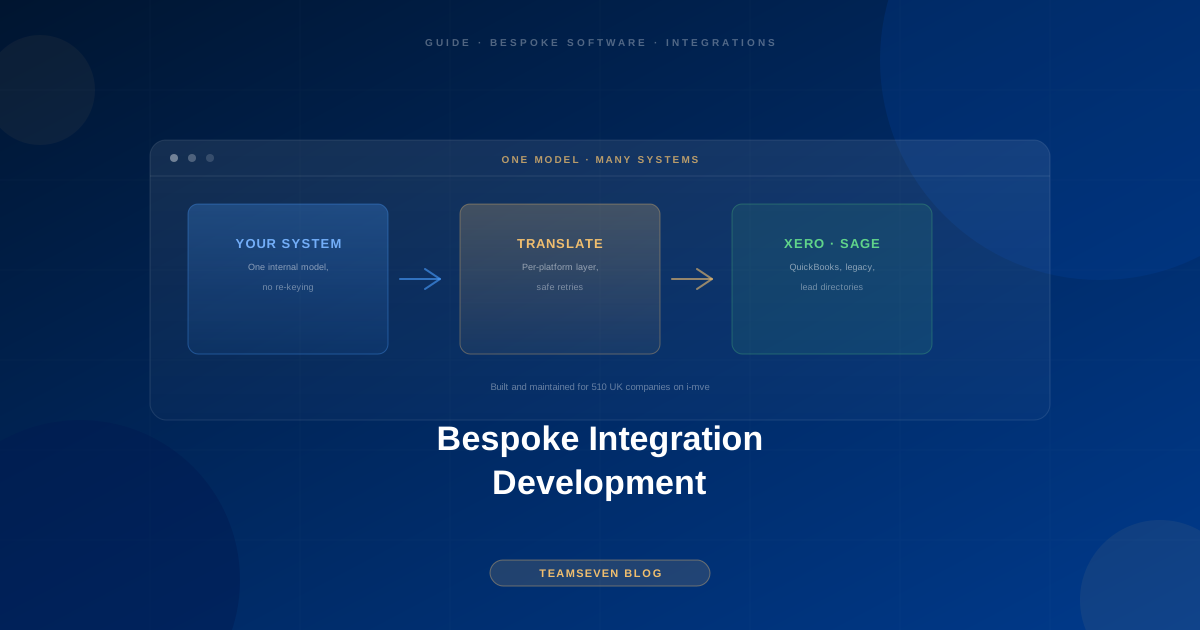
- The platforms are not the same underneath. Tax handling, invoice structure, and contact models differ between Xero, QuickBooks, and Sage. The robust approach is one internal model with a translation layer per platform, not three sets of special cases spread through the code.
- Retries must be safe. Networks fail mid-request. Every sync operation needs an idempotency key so a retry can never create a duplicate invoice.
- Partial failure is normal. One invoice in a batch fails validation; the other ninety-nine should still go through, and the failure should be visible and fixable.
We wrote up the engineering in detail in connecting a custom CRM to Xero, QuickBooks, and Sage.
Lead, payment and industry integrations
Beyond accounting, most UK builds involve some combination of:
- Lead and enquiry sources. On i-mve, enquiries arrive from the company's own website, phone calls, and UK lead directories such as Compare My Move, PinLocal and Getamover, each in a different shape. A shared internal enquiry model with a translation per source keeps the rest of the system simple. More on that in carrier and lead platform integrations for logistics software.
- Payment providers. Card payments, deposits, and payment terminals, integrated so payment status flows back into the operational system automatically.
- Hardware and physical systems. On a smart parking platform we built, the software integrates with ANPR cameras, boom gates, and contactless payment terminals. See what the software side of ANPR integration handles.
Legacy systems with no API
The hardest integrations are with older systems that were never designed to talk to anything. There are a few honest options, in order of preference:
- Use what's there. Many older systems have a database, a file export, or an undocumented interface that can be used safely and read-only.
- Put a stable API in front of it. A small service that reads from and writes to the legacy system and exposes a clean, documented API to everything else. New software talks to the API, never to the legacy system directly.
- Scheduled, verified file exchange. Sometimes a well-monitored nightly export and import is the right answer, as long as failures are detected and reported.
- Replace it gradually. Once an API sits in front of the legacy system, its functions can be moved to new software one at a time, without a risky big-bang replacement. See rewrite vs refactor.
What you should avoid is direct writes into a legacy database from new code with no translation layer. It works in the demo and breaks the first time the old system is patched.
What separates an integration that lasts
The same four principles apply to every integration we build:
- Normalise internally, translate at the edge. One internal model; the quirks of each external system live in one place.
- Assume partial failure is normal. Retries are safe, failures are isolated, nothing is silently dropped.
- Monitor the integration as its own thing. Sync success and failure rates are tracked per platform, so a problem is caught by the team before it becomes a customer's support ticket.
- Keep ownership with you. API credentials, developer accounts, and app registrations belong to your business, not your agency.
How integration work is scoped
Integration work is scoped by the number of systems, the direction of data flow (one-way or two-way), the volume, and the quality of the other side's API. A one-way sync to Xero from a system we are already building is modest. Two-way synchronisation with a legacy system that has no API is a much larger job. We price integration work at a fixed price after a scoping call, as part of a wider bespoke software development UK build or as standalone systems integration services.
After launch, integrations need looking after: third-party APIs change, authorisation methods are updated, and versions are retired. That upkeep is part of our software maintenance and support retainer.
FAQ
What is bespoke integration development? Building custom connections between the software systems a business already uses, such as a CRM, accounting platform, lead sources, and legacy systems, so data moves between them automatically instead of being re-keyed by hand.
Can you integrate with Sage 50 or older desktop versions? Often, yes, but desktop and older versions offer fewer integration options than cloud versions. We'd confirm what your specific version exposes during scoping before committing to an approach.
Can you connect a system that has no API? Usually. The common approaches are reading from its database or exports, putting a small API service in front of it, or a monitored scheduled file exchange. We'd assess which is safe for your system before proposing one.
Should we replace our old system instead of integrating it? Not necessarily. If the system does its job and the problem is the data trapped inside it, integration is faster and lower risk. If the system itself is failing, replacement may be right, ideally gradually behind a stable API.
What happens when Xero or another platform changes its API? Integrations need maintenance for exactly this reason. Monitoring catches failures early, and a maintenance retainer covers updating the integration when a platform changes.
Muhammad Nabeel is the co-founder of Teamseven. We built and maintain the accounting and lead integrations behind i-mve for 510 UK companies. If your systems don't talk to each other, book a free 30-minute call.
Related reading
Stay connected
Build notes, launches, and new articles from the Teamseven team.